Run the bar and the tables from one screen
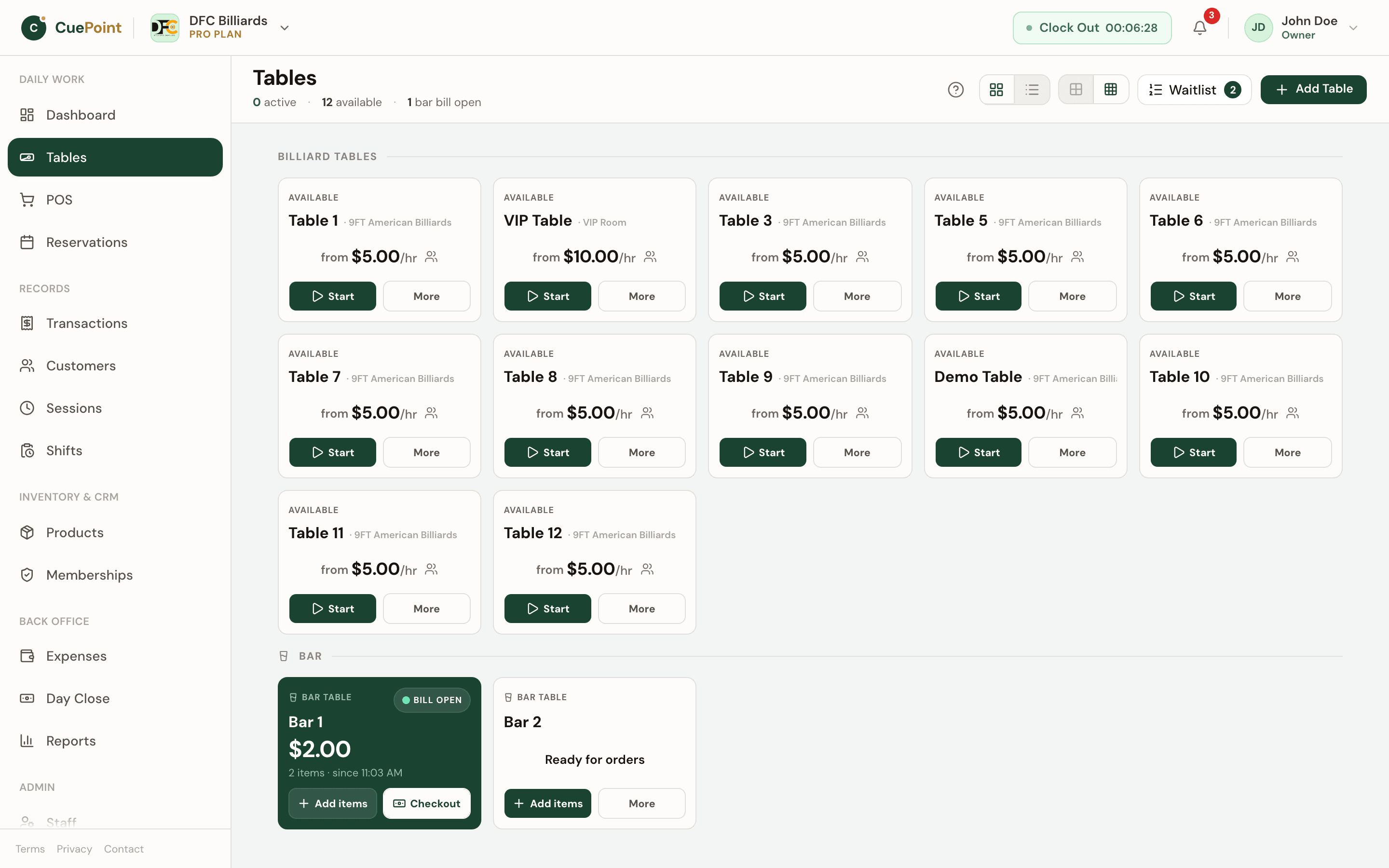
Bar tables carry a bill with no timer, billiard tables bill by time, and both settle in one checkout. CuePoint keeps the bar and the floor on one screen, one receipt, and one set of reports.
Free plan available. No credit card required.
Two books, one bar
A bar with pool tables runs two books. The bar keeps a tab per seat or per group, the tables keep a timer, and at closing time someone reconciles the two by hand. Drinks ordered from the table end up on the wrong bill, table time gets rounded from memory, and the night's numbers are only as good as the notes.
Generic bar POS systems do not know what a table timer is, and billiard hall software usually treats every table as a timed table. A group that finishes a game, moves to the bar, and keeps drinking either gets two bills or a table that stays occupied while the timer keeps running.
Owners also want to know where the money came from. Was tonight strong because of table time or because of the bar? Two books cannot answer that without another spreadsheet.
One floor, one checkout
CuePoint lets you mark any table as a bar table. A bar table has no timer: its bill opens with the first item staff add, or the first QR order a customer sends from their phone, and it stays open until checkout. Billiard tables keep billing by time from their Table Rate Type, on the same floor and in the same list.
When a game ends and the group wants to keep the evening going, staff transfer the session to a bar table. The timer stops, the table time stays on the bill as its own line, the orders move with it, and the billiard table is free for the next players. One checkout, one receipt.
Reports keep table time on the billiard tables and bar sales on the bar tables, so utilization stays honest and the bar's revenue shows up where it was earned.
What a bar with pool tables gets
Bar tables with no timer
Choose Bar table as the table kind and the table runs on a bill instead of a clock; the first item opens it.
QR ordering at the bar
On Growth and Pro, customers scan the bar table's code and order from their phone before any bill exists; staff approve before it lands on the bill.
Transfer a game to a bar table
Stop the timer, keep the table time on the bill, carry the orders, and free the billiard table in one step.
One checkout, one receipt
Table time and bar orders settle together with the payment methods, discounts, and receipts you already use.
Table time stays on the billiard table in reports
Transferred bills split their revenue between the billiard table and the bar table, so utilization and sales reports stay accurate.
Bar tables, answered
Set up your first bar table in a minute
Create your account, then choose Free or try Pro for 14 days.
More billiard hall software use cases
Billiard hall POS system for table time and checkout
CuePoint combines table time billing and food, drinks, and rental orders into one POS checkout screen built for billi...
Billiard hall QR ordering for table-side food and drink o...
CuePoint QR ordering lets customers scan a table code, order from their phone, and staff confirm before items hit the...
Billiard hall open tab software: park sales and settle later
Let regulars run a tab all night. CuePoint tracks every item, keeps stock accurate, and settles in one step at closin...