Billiard hall revenue reports and table utilization software
Know your real numbers every day, not after the calculator comes out. CuePoint shows daily revenue, table utilization, and product sales the moment they happen.
Free plan available. No credit card required.
Why manual end-of-day reports hide revenue problems
In most billiard halls, the owner doesn’t know how much they made until someone sits down after closing and adds up the register. If the numbers look wrong, there’s no way to trace where the discrepancy started. The calculator is the last line of defense.
Table revenue is especially hard to track manually. Different tables, different rates, different session lengths, all calculated by hand and written in a logbook. Transposing those numbers to a spreadsheet introduces more errors. By the time the owner sees a “daily report,” it’s an estimate at best.
Without real-time visibility, owners can’t make informed decisions. Which tables are underutilized? Which time slots are busiest? Which products actually make money? These questions require data, and logbooks don’t generate reports.
How CuePoint tracks billiard hall revenue in real time
CuePoint records revenue at the moment of checkout. Every table session, every product sale, every membership payment, captured instantly. Your daily revenue figure updates in real time, not at closing.
Reports open on a Summary tab: revenue, expenses, net, and transactions for any period, on one screen. Behind it, the full picture: revenue breakdown (sessions vs. products vs. memberships), a Profit & Loss view that lists every expense in each category, table utilization charted by hours used or by revenue (active, idle, reserved), product sales, membership activity, and loyalty points. Filter by any date range.
Reports export to Excel and CSV within your plan's limits. If you need to feed numbers into accounting software or share them with a partner, the data is always accessible. No locked-in formats, no proprietary exports.
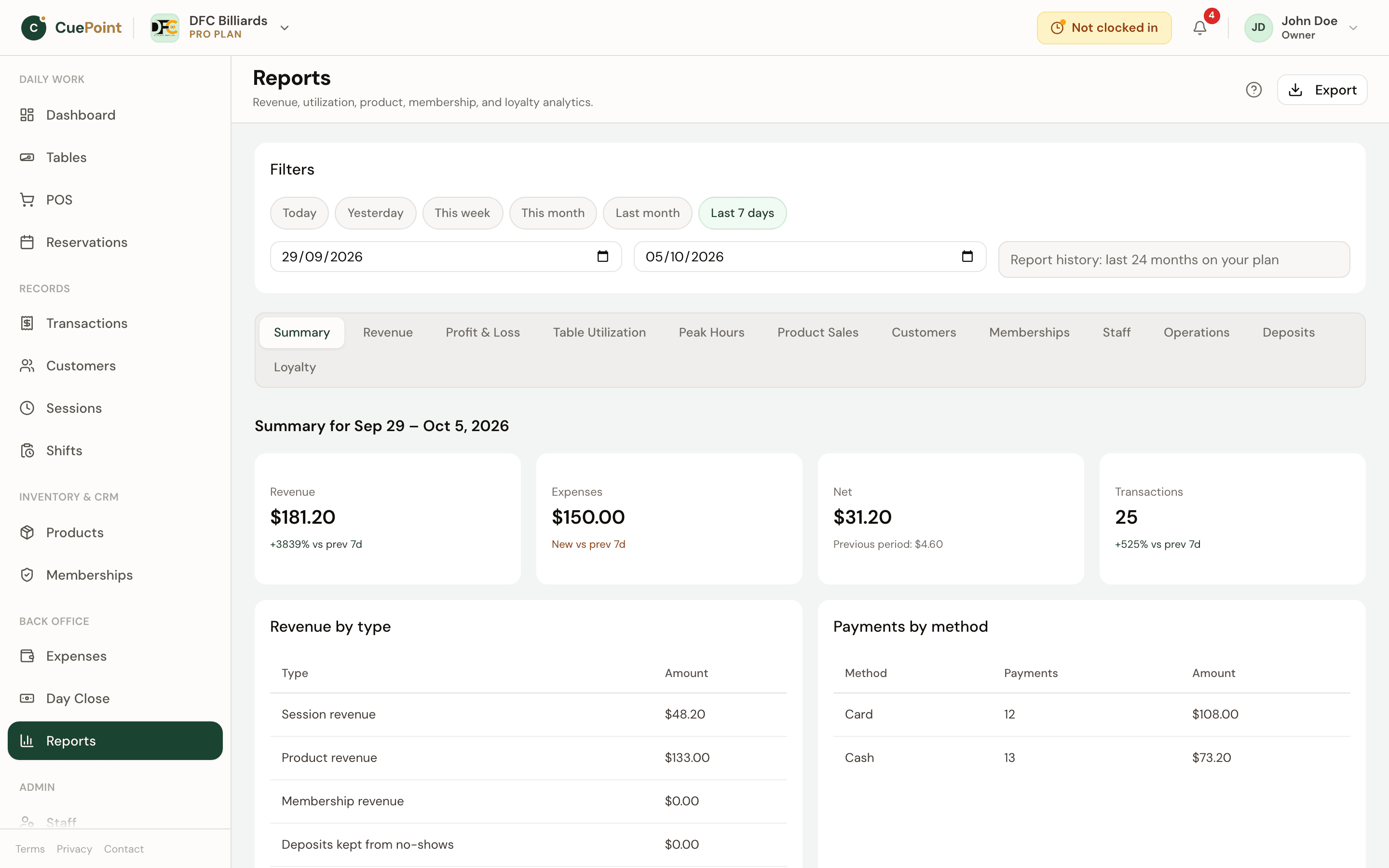
Summary, Profit & Loss, utilization, and export features
Summary on one screen
Revenue, expenses, net, and transactions for any day, week, or month, before you open a single detail report.
Revenue breakdown
Session income vs. product sales vs. membership income, separated clearly.
Profit & Loss drill-down
Every expense listed inside its category, so the net is explainable, not just a number.
Table utilization
Hours used or revenue per table, with active, idle, and reserved time. See which tables earn and which sit empty.
Excel and CSV export
Export any report to Excel or CSV for accounting, partners, or record-keeping, within your plan's limits.
Billiard hall reporting FAQs
See what your hall is really earning
Create your account, then choose Free or try Pro for 14 days.
More billiard hall software use cases
Billiard hall POS system for table time and checkout
CuePoint combines table time billing and food, drinks, and rental orders into one POS checkout screen built for billi...
Pool table time tracking software for billiard halls
CuePoint helps billiard halls track pool table time accurately, apply table rates automatically, and send final charg...
Pool hall inventory management software
CuePoint tracks your snack bar, drinks, and rental inventory with automatic deduction at checkout and low-stock alert...