Pool table time tracking software for billiard halls
CuePoint tracks every second automatically, applies your table rates, and sends accurate charges to checkout. Replace logbooks, stopwatches, and manual calculations with a real-time table management system.
Free plan available. No credit card required.
Why manual pool table time tracking loses revenue
Manual table timing causes lost revenue. When staff rely on logbooks, calculators, and memory, table sessions are easy to misrecord. A few missed minutes per table can turn into meaningful revenue loss every day.
Consider a hall with 8 tables. If each table loses just 15 minutes of billable time per day, that adds up to 2 hours of unbilled time daily. At any hourly rate, that is real money, every month. Logbooks cannot catch what staff forget to write down.
Busy nights make it worse. With 8 or 10 tables running, staff lose track of which table started when. A table that ran 2 hours and 20 minutes gets billed for 2 hours. Promo rates that should only apply on weekday afternoons get used on Saturday nights. Minimum charges get skipped. There is no system enforcing your pricing, just staff memory.
How CuePoint tracks billiard table time automatically
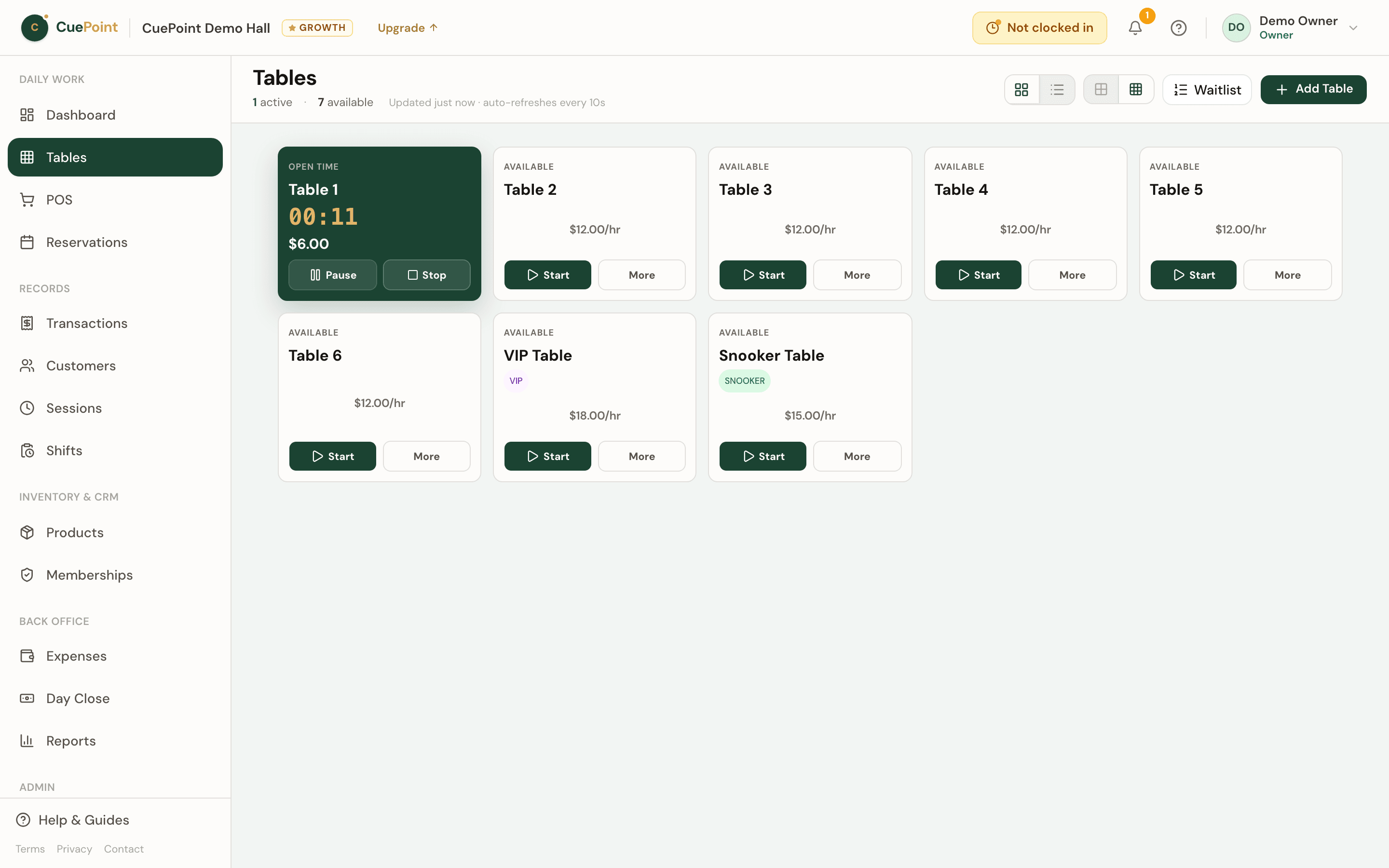
CuePoint starts a timer on our servers the moment you open a table. Time is tracked to the second and displayed live on your floor view. Every staff member sees the same real-time status: which tables are active, how long they’ve been running, and what rate applies.
When a session ends, the system calculates the charge based on your rules: exact time, 15-minute blocks, or 30-minute blocks, with optional minimum charges. Promo rates apply automatically based on the day and time you set. The final table charge flows directly into POS checkout alongside any food, drink, or accessory orders.
If a customer pauses for a break, staff can pause the session and time stops. When play resumes, the timer continues. If a table needs to move, staff can transfer the session to another table without losing any data. Timers keep running accurately even if a staff member refreshes the browser or switches devices. Only authorized staff can adjust sessions.
Manual logbook vs. CuePoint
How missed minutes add up
If your hall loses just 15 minutes of billable time per table per day:
Substitute your own rate — the math scales the same way.
Pool table time tracking features
Start table sessions in seconds
One tap to open a table. The timer starts immediately on our servers. No writing start times in a logbook.
Live floor view for staff
See all tables at a glance: active, paused, reserved, or available. Elapsed time, rate, and running total update in real time.
Apply rates automatically
Base rates, promo rates, and minimum charges apply based on the rules you set. Staff don’t decide; the system enforces your pricing.
Handle minimum charges and rounding
Choose exact time, 15-minute blocks, or 30-minute blocks. Set minimum session charges per rate.
Pause or transfer players when needed
Pause sessions during breaks. Transfer running sessions between tables. No data lost, no manual recalculation.
Send table charges to checkout
Table time and product orders combine into one total at checkout. No separate calculator needed.
Track table revenue by day
Revenue reports are generated from actual session data. See earnings by table, by day, or by staff member.
Reduce cashier and staff mistakes
Every session is logged with start time, end time, rate applied, and the staff member who handled it. Adjustments require authorization.
Pool table time tracking FAQs
Start tracking table time accurately today
Create your account, then choose Free or try Pro for 14 days.
More billiard hall software use cases
Billiard hall POS system for table time and checkout
CuePoint combines table time billing and food, drinks, and rental orders into one POS checkout screen built for billi...
Happy hour pricing software for billiard halls
Run happy hour, weekday, and overnight promo rates that apply automatically. Preview pricing before you save. Old rec...
Billiard hall revenue reports and table utilization software
See your real daily revenue immediately: table sessions, product sales, and memberships broken down clearly. No end-o...
Billiard hall reservation system for staff-managed bookings
Keep table bookings organized so your staff is ready before customers arrive. CuePoint manages reservations alongside...
Billiard hall management software built for Philippine po...
CuePoint is billiard hall management software built in the Philippines. Track table time, POS checkout, inventory, GC...
Pool hall management software for tables, POS, and daily ...
CuePoint is pool hall software that combines table session tracking, POS checkout, reservations, and revenue reports ...